


Antivrus Clean: Virus & Junk
3.7180.00 Reviews
App Specs
- Version
- 1.0.0.7
- Updated On
- License
- Free
- Downloads
- 5,000,000+
- Developer
- Eduspot
- Categories
- Tools
- Platform
- Android
Screenshots
 Analysis by AppCompare
I’d start by asking what problem you actually want a phone tool to solve. If you’re short on storage, uneasy about unfamiliar downloads, or simply want one place to run a check and tidy up, a combined cleaner and antivirus app can feel convenient. If your phone is working normally and storage is comfortable, though, installing another utility may add more upkeep than value. I see Antivrus Clean: Virus & Junk as a practical option for people who want a straightforward set of maintenance tools, rather than a replacement for careful download habits or the phone’s built-in settings.
What I’d check before installing
I’d first decide whether I need a scanner, a way to review storage, or both. Those needs overlap, but they are not the same: deleting expendable files can help with space, while a security scan is meant to flag potential risks. A “booster” label also deserves a little perspective. Closing background activity may make a phone feel less busy for a moment, but it is not a guaranteed route to lasting speed. Keeping those distinctions in mind helps me judge the app by useful tasks instead of expecting one tap to fix every slowdown.
It also helps to think about how often I would use it. A person who downloads files regularly or likes to check what is taking up space may appreciate having these tools together. Someone who rarely installs anything and already manages storage comfortably might be better served by occasional checks in the phone’s own settings. I would install this because I have a specific maintenance job for it, not just because every phone supposedly needs a cleaner running all the time.
Where a combined cleaner can be handy
The strongest practical case here is convenience. Instead of switching between a security utility and a separate storage-management screen, I can begin with a scan, review the clutter suggestions, and decide what to do next. That is especially useful when a phone is nearly full and I need to make room before saving a file or taking more photos. The key is to treat the cleaner’s suggestions as a shortlist to inspect, not as an instruction to erase everything it identifies.
For example, if I notice a messaging app is taking up space, I would check that app’s own media and download controls before deleting anything from a general cleaner. Some files that look disposable may be useful offline copies or items I have not backed up. I would make the same kind of check before removing an app the utility says I have not used recently: infrequent use does not always mean unimportant, especially for travel, work, or account recovery.
How it sits beside the usual alternatives
Compared with using only Android’s built-in storage controls, a combined tool can make routine checks feel more direct by putting cleanup and security tasks in one place. The trade-off is that system settings are already part of the phone, so someone who only wants to clear space may not need another app. A dedicated security product may suit a person who wants to focus mainly on protection, while a storage tool may be simpler for someone whose only concern is crowded memory. I’d choose this kind of all-in-one approach when I genuinely expect to use both sides of it.
I would not treat any scanner as permission to install unknown apps or open suspicious attachments. A warning is useful only if I pause and act on it; everyday habits still matter. Likewise, if I want detailed control over exactly which files are removed, I prefer to inspect folders or use the relevant app’s own storage tools rather than approving a broad cleanup without review. That caution is not a flaw unique to this app—it is part of using any automatic cleaner responsibly.
Worth Reading Before You Choose

EA SPORTS FC Mobile 26 Is a Bigger Football Game, but It Takes Time

Flipboard Shows What News Apps Must Do Beyond the Feed

Switching to Android Auto Means Rethinking Your Driving Routine

Google Calendar Makes a Crowded Week Easier to Manage

Ludo King Makes the Most of the Minutes Between Plans

Baby Panda World Brings Quick Play to Modern Phones, but Its Game Library Feels Busy
A realistic routine, without over-cleaning
My sensible routine would be occasional rather than constant. If I were preparing for a trip and needed room for offline maps or documents, I’d run a scan, look over the junk suggestions, and then review large or unused apps manually. I would leave personal downloads and media alone unless I knew they were backed up or could be downloaded again. After freeing space, I’d use the phone normally and see whether the original problem was actually solved instead of repeatedly tapping a booster out of habit.
That approach also answers a common concern: should a cleaner be run every day? I would not make that a default. Repeatedly clearing temporary data can mean apps need to rebuild files they would otherwise reuse, and repeatedly closing apps can work against how the phone manages its resources. A periodic check when storage feels tight or something seems unusual is a more measured use. If a slowdown persists, I would look at the individual app, available storage, and system updates rather than assuming a cleaner can diagnose every cause.
Who is likely to get the most from it
I can see this being useful for someone who prefers a simple, guided maintenance screen and wants a quick way to review both security and clutter. It may also suit a less technical family member who benefits from having the main actions visible without navigating through several settings menus. In that situation, I would show them how to read a result and make a deliberate choice, rather than telling them to accept every prompt automatically.
On the other hand, I would skip it if I only wanted to remove a couple of large videos, if I already use a security app I trust, or if I prefer to manage every file manually. It may also be a poor fit for someone who expects a cleaner to produce a dramatic, permanent speed increase. The most reliable benefit to look for is a clearer view of possible maintenance tasks, not a promise that the phone will behave like new.
There is a small but important switching cost with any all-in-one utility: learning which recommendations are useful for your own habits. The first cleanup may take longer because I would inspect the categories and avoid removing anything I cannot identify. Once I know what the app flags on my device, later checks can be quicker. If I stop using it, I would still be able to manage storage through Android settings, so trying the tool does not need to become a permanent commitment.
In ordinary use, I would also pay attention to how often the app asks me to return to it. A utility is most helpful when it stays a tool I choose to open, rather than becoming another source of alerts that compete for attention. If its prompts feel excessive or its recommendations are hard to understand, I would scale back how often I use it or rely on the phone’s own controls. That is a reasonable way to judge any cleaner: does it make a real task easier without creating a new chore?
There are a few practical questions I would settle during the first session. I’d check what the scan actually reports, read the cleanup categories before confirming anything, and see whether the app’s protection is enabled in the way I expect. I’d also keep an eye on whether the phone’s behavior changes after cleanup, rather than judging success by a reassuring animation. Those small checks help me distinguish an actionable finding from a general prompt, and they reduce the risk of deleting something I meant to keep.
First Impressions and Features
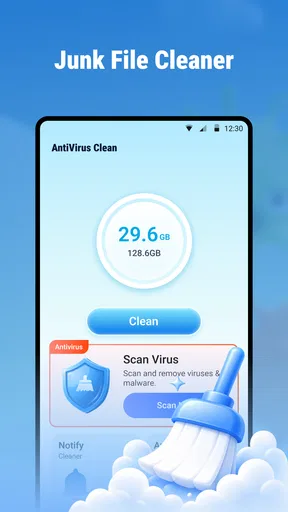
The moment I opened Antivirus Clean, I was greeted by a clean and straightforward interface. It’s like the app knows that you want to get straight to the point without any unnecessary frills. The main screen offers a quick scan option, which is perfect for those moments when you feel like your phone might be acting a bit off. And trust me, we all have those paranoid moments.
Now, what really got me interested were the additional features. This app isn’t just about scanning for viruses. Oh no, it’s like a Swiss Army knife for your phone. There’s a junk cleaner, which, to my surprise, managed to free up a decent chunk of space. Who knew all those random cache files were taking up so much room?
The Virus Scanner
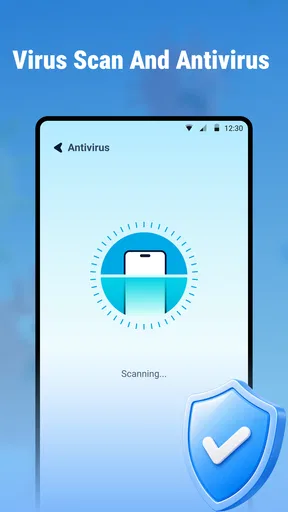
Let’s talk about the main event – the virus scanner. It runs a thorough check of your apps and files, ensuring that there’s nothing malicious lurking in the background. During my test, the scan was relatively quick and didn’t slow down my phone, which is a huge plus. I’ve used other antivirus apps before, and they sometimes make my phone feel like it’s trudging through mud.
Another neat feature is the real-time protection. Once activated, it keeps a vigilant eye on any new apps or files you download, ready to alert you if something seems fishy. It’s like having a digital watchdog by your side.
Junk Cleaner and Booster
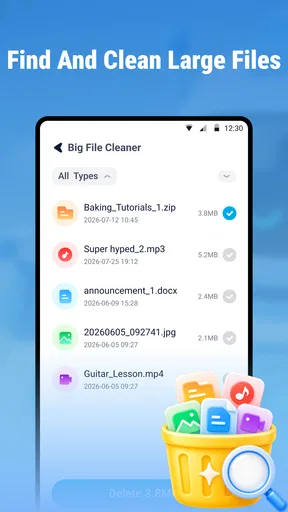
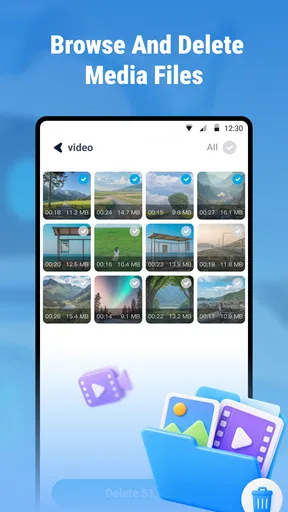
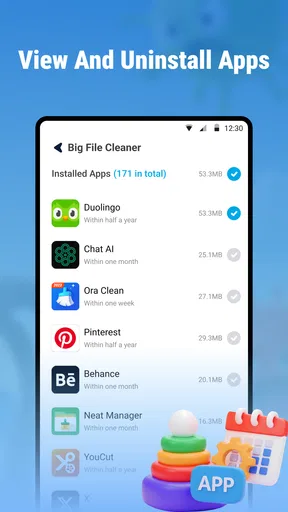
Next up, the junk cleaner. I wasn’t expecting much, but it turns out my phone was hoarding quite a bit of digital clutter. The app quickly identified unnecessary files and offered to clean them up. After a quick tap, voilà – more storage space! It even suggests apps you haven’t used in a while, so you can decide if it’s time to let them go.
There’s also a phone booster feature, which claims to speed up your device. After using it, my phone did feel a bit snappier, especially when switching between apps. It’s like giving your phone a little caffeine boost.
User Experience and Design
One of the things I really appreciated about Antivirus Clean is its user-friendly design. Everything is laid out intuitively, so even if you’re not particularly tech-savvy, you won’t have trouble navigating through the app. The colors are easy on the eyes, and the icons are self-explanatory, making it an overall pleasant experience.
Moreover, the app doesn’t bombard you with ads every few seconds, which is a refreshing change. There are a few here and there, but they’re not invasive. It’s the kind of app where you can get things done without any annoying interruptions.
Final Thoughts
After giving Antivirus Clean: Virus & Junk a thorough test drive, I have to say, it’s a solid choice for anyone looking to keep their phone in check. It’s efficient, easy to use, and doesn’t try to do too much at once – it knows its strengths and plays to them well.
If you’re like me and occasionally worry about what might be lurking in the depths of your phone, this app is definitely worth a download. It’s like having a digital cleaning crew on standby, ready to spring into action whenever you need it. So go ahead, give your phone the cleanup it deserves, and enjoy some peace of mind.
Who should make the call
Eduspot’s utility is free, rated for Everyone, and has reached over a million installs, so it is easy to try without treating it as a major purchase decision. Its average rating is 3.9 from around 3,100 ratings, with 66 written reviews, which suggests a mixed but broadly workable reception rather than universal enthusiasm. It was released on September 5, 2025, and version 1.0.0.6 supports Android 8.0 and later. I would check compatibility before making it part of my routine, especially on an older phone.
The short store label, “Antivrus Clean,” is not a substitute for judging what the app does on your own device. I would install it only if the combined scan and cleanup workflow sounds useful, then take time to review its suggestions before accepting them. It is a reasonable fit when I want guided maintenance in one place; it is not essential for every Android user, and I would choose built-in controls or a more focused security option if those better match my needs.
Pros
- Lightweight and efficient on system resources.
- Real-time protection against malware threats.
- Intuitive interface for easy navigation.
- Regular updates ensure latest virus definitions.
- Offers additional tools for device optimization.
Cons
- Free version has limited features.
- Occasional ads can disrupt usage.
- Some advanced tools require purchase.
- May flag safe apps as threats occasionally.
- Initial scans can be slow on older devices.
FAQs for Antivrus Clean: Virus & Junk
What features does Antivirus Clean: Virus & Junk offer?
Antivirus Clean: Virus & Junk provides a comprehensive suite of features, including real-time virus scanning, junk file cleaning, device optimization, and privacy protection. It also offers anti-phishing and anti-malware tools. These features help keep your device running smoothly and securely by identifying and eliminating threats and unnecessary files.
Is Antivirus Clean: Virus & Junk safe to use on my device?
Yes, Antivirus Clean: Virus & Junk is designed to be safe for both Android and iOS devices. It does not access personal data beyond what is necessary to perform its functions, and it adheres to strict privacy policies. Always download the app from official app stores to ensure its authenticity.
Does using Antivirus Clean significantly impact battery life?
Antivirus Clean: Virus & Junk is optimized to minimize its impact on battery life. While it runs background checks and optimizations, these processes are designed to be efficient. Users typically experience minimal battery drain, as the app is engineered to balance performance and power consumption.
Is Antivirus Clean: Virus & Junk free, or does it require a subscription?
Antivirus Clean: Virus & Junk offers a free version with basic features. However, to access advanced functionalities such as enhanced security measures and premium customer support, users may need to subscribe to a paid plan. The subscription details are available within the app.
How often should I use Antivirus Clean: Virus & Junk on my device?
For optimal performance and security, it's recommended to use Antivirus Clean: Virus & Junk at least once a week. Regular use helps keep your device free from viruses, malware, and unnecessary files. The app also provides notifications and reminders to run scans and cleanups as needed.


